Audio Transcription App for Android
About
This example demonstrates how to build a real-time audio transcription (speech-to-text) Android application using SwitchboardSDK, Switchboard SileroVAD extension and Switchboard Whisper extension.
Architecture Overview
ExampleScreenrenders the UI, displays real-time transcriptions, shows VAD state, and provides controls for SileroVAD and Whisper STTExampleViewModelholds UI state and connects the UI layer to SwitchboardHandlerSwitchboardHandleracts as the bridge between the app and Switchboard SDK, handling all SDK interactions
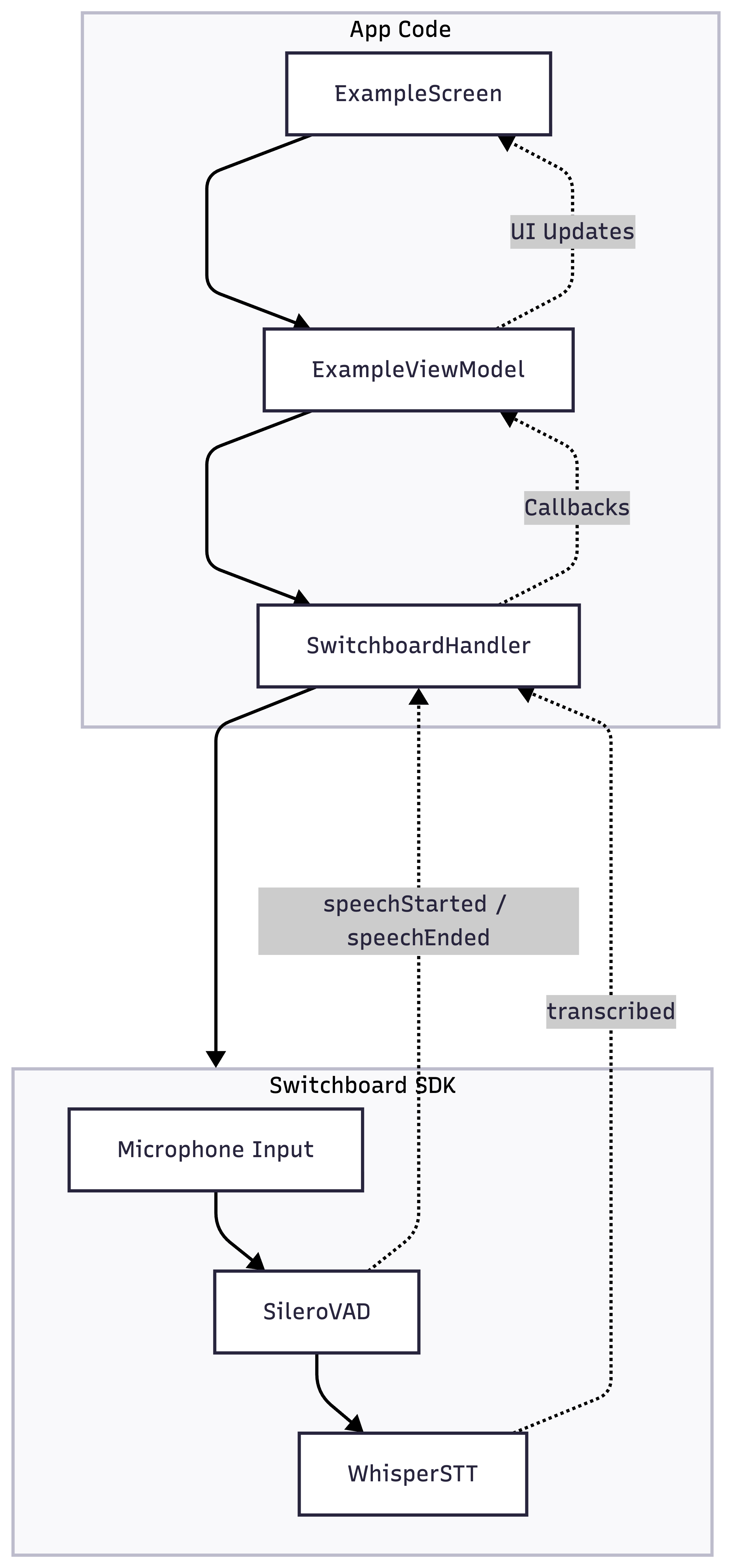
SwitchboardHandler acts as the bridge between the app and the SDK. Switchboard SDK handles all the audio processing and transcription configured by the AudioGraph JSON file.
Project Structure
app/
├── src/
│   ├── main/
│   │   ├── java/com/synervoz/sampleapp/whisperstt/
│   │   │   ├── MainActivity.kt
│   │   │   ├── data/
│   │   │   │   └── ExampleState.kt
│   │   │   ├── switchboard/
│   │   │   │   └── SwitchboardHandler.kt      # Switchboard SDK handler
│   │   │   ├── ui/
│   │   │   │   └── ExampleScreen.kt           # UI screen
│   │   │   ├── utils/
│   │   │   │   ├── AssetUtils.kt              # Asset management
│   │   │   │   └── SystemMonitor.kt           # System performance monitoring
│   │   │   └── viewmodel/
│   │   │       └── ExampleViewModel.kt
│   │   ├── assets/
│   │   │   │── STTAudioGraph.json             # Audio processing pipeline configuration
│   │   │   │── ggml-base.en.bin.json
│   │   │   └── ggml-tiny.en.bin.json
└── build.gradle
Audio Processing Pipeline
The application captures audio from the microphone, routing it to both SileroVAD for voice activity detection and Whisper STT for transcription. SileroVAD emits speechStarted and speechEnded events to track voice activity - when it detects the end of speech, it triggers Whisper STT to transcribe that segment, which then emits a transcribed event with the text.
Microphone Input → Voice Activity Detection → Speech To Text
The audio processing pipeline is defined in STTAudioGraph.json.
// STTAudioGraph.json

{
  "type": "Realtime",
  "config": {
    "microphoneEnabled": true,
    "graph": {
      "config": {
        "sampleRate": 16000,
        "bufferSize": 512
      },
      "nodes": [
        {
          "id": "multiChannelToMonoNode",
          "type": "MultiChannelToMono"
        },
        {
          "id": "busSplitterNode",
          "type": "BusSplitter"
        },
        {
          "id": "vadNode",
          "type": "SileroVAD.VAD"
        },
        {
          "id": "sttNode",
          "type": "Whisper.STT"
        }
      ],
      "connections": [
        {
          "sourceNode": "inputNode",
          "destinationNode": "multiChannelToMonoNode"
        },
        {
          "sourceNode": "multiChannelToMonoNode",
          "destinationNode": "busSplitterNode"
        },
        {
          "sourceNode": "busSplitterNode",
          "destinationNode": "vadNode"
        },
        {
          "sourceNode": "busSplitterNode",
          "destinationNode": "sttNode"
        },
        {
          "sourceNode": "vadNode.speechEnded",
          "destinationNode": "sttNode.transcribe"
        }
      ]
    }
  }
}
- inputNode → Capture microphone audio input
- MultiChannelToMono → Make sure we have mono signal for processing
- BusSplitter → Split audio for parallel VAD and STT processing
- SileroVAD.VAD → Detect speech start/end point
- Whisper.STT → Convert speech to text when voice activity (end event) is detected
Important thing to note here is that Whisper STT works with 16000 hz sample rate.
Models available in the application
- ggml-tiny.en.bin: Faster processing, lower accuracy
- ggml-base.en.bin: Slower processing, higher accuracy
How to Use
- Start Button: Begin audio capture and transcription
- Stop Button: End audio processing
- Real-time transcription appears as you speak
VAD Configuration Controls
Adjust Voice Activity Detection parameters in real-time to control the audio segments sent to Whisper STT.
-
Threshold (Float, default: 0.5)
- The sensitivity threshold for detecting voice activity
- Lower values: Less strict detection, more sensitive to quiet sounds
- Higher values: Stricter detection, requires louder speech to trigger
-
Min Silence Duration (Int, default: 100ms)
- The minimum duration of silence required to consider speech as ended
- Lower values: Small amount of silence can segment audio, leading to STT transcribing short audio segments
- Higher values: Longer pauses required to end speech, leading to STT transcribing longer audio segments
Source Code
You can find the source code on the following link:
Audio Transcription Example - Android